Public Pages
Public pages are available before login and explain the company, destinations, policies, support information, and contact paths.
Core pages
Home
Route: /
The Home page is divided into multiple website sections. Each section explains a different part of the student journey and can be documented separately.
Home sections
- Hero section.
- Popular search card.
- Success stories.
- Study program section.
- Study destinations.
- Partner or institution section.
- Guides, events, or newsroom highlights.
- Final call-to-action section.
Hero section
The hero section is the first section visitors see on the Home page. It includes the main headline, supporting text, and the search box.
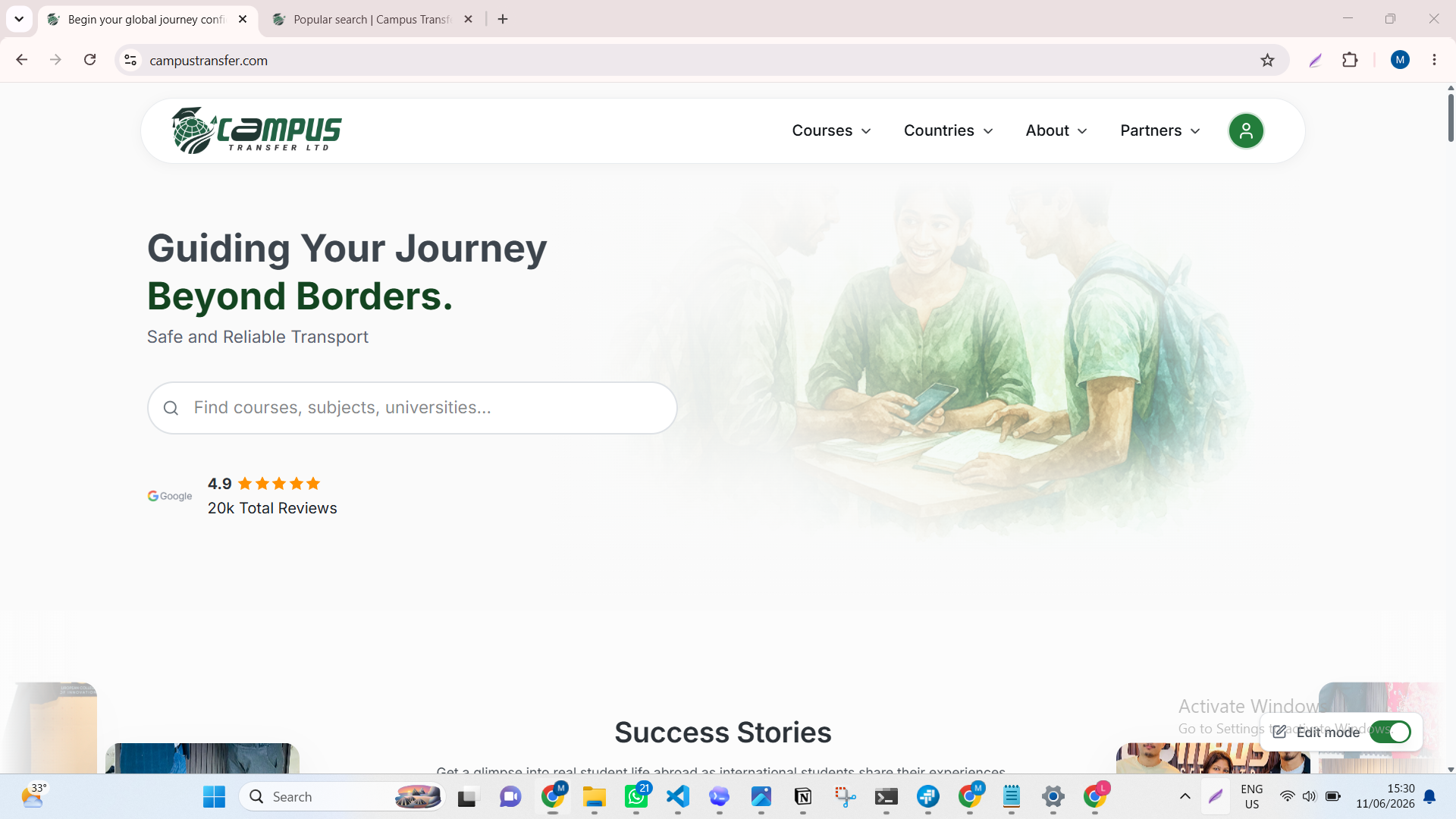
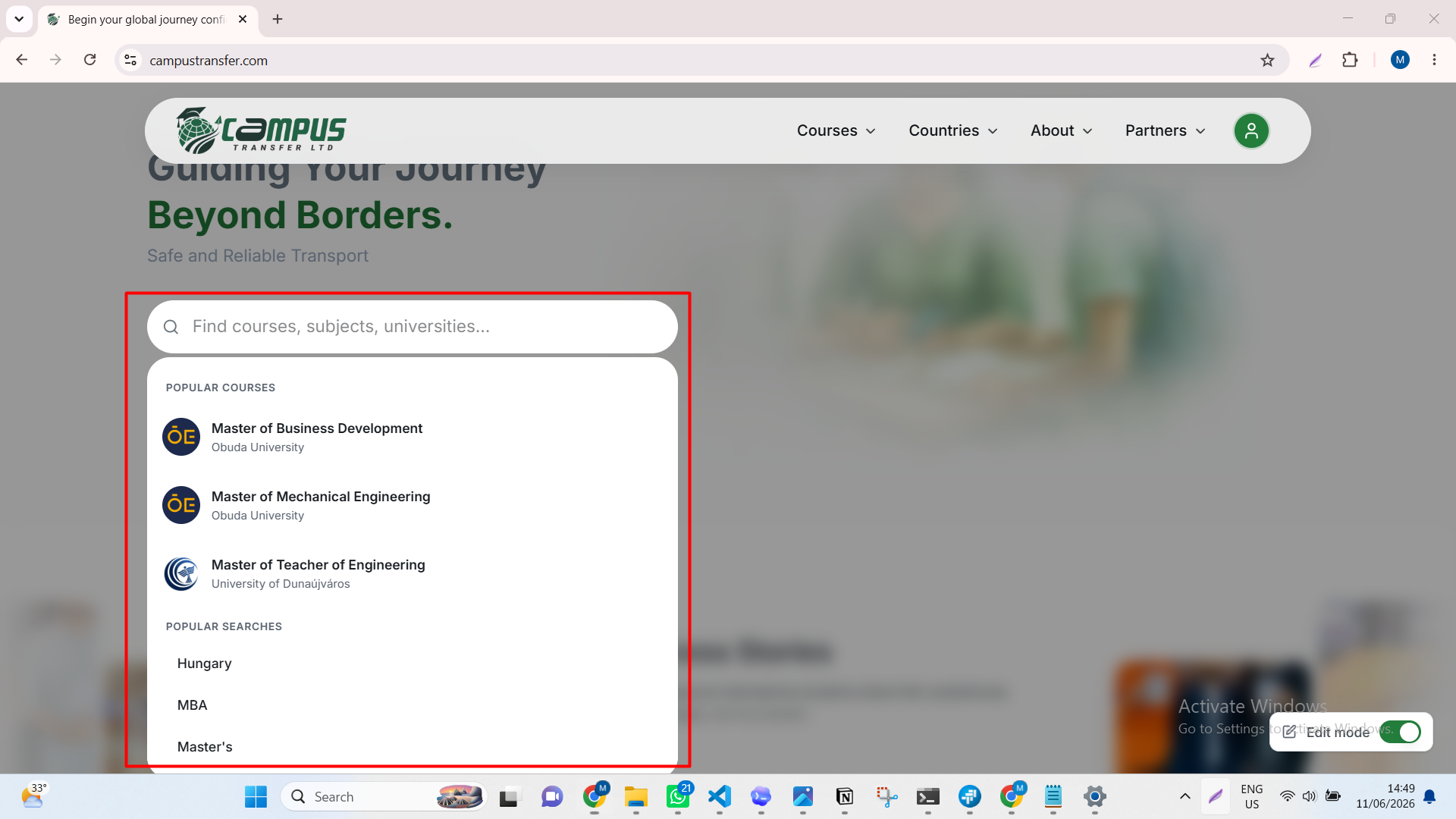
When a visitor clicks the hero search box, a popular search card opens under it.
The popular search card is managed from the admin panel. The rest of the hero content is dynamic and can be updated through Content Management.
Popular search card shows:
- Popular courses.
- Popular search keywords.
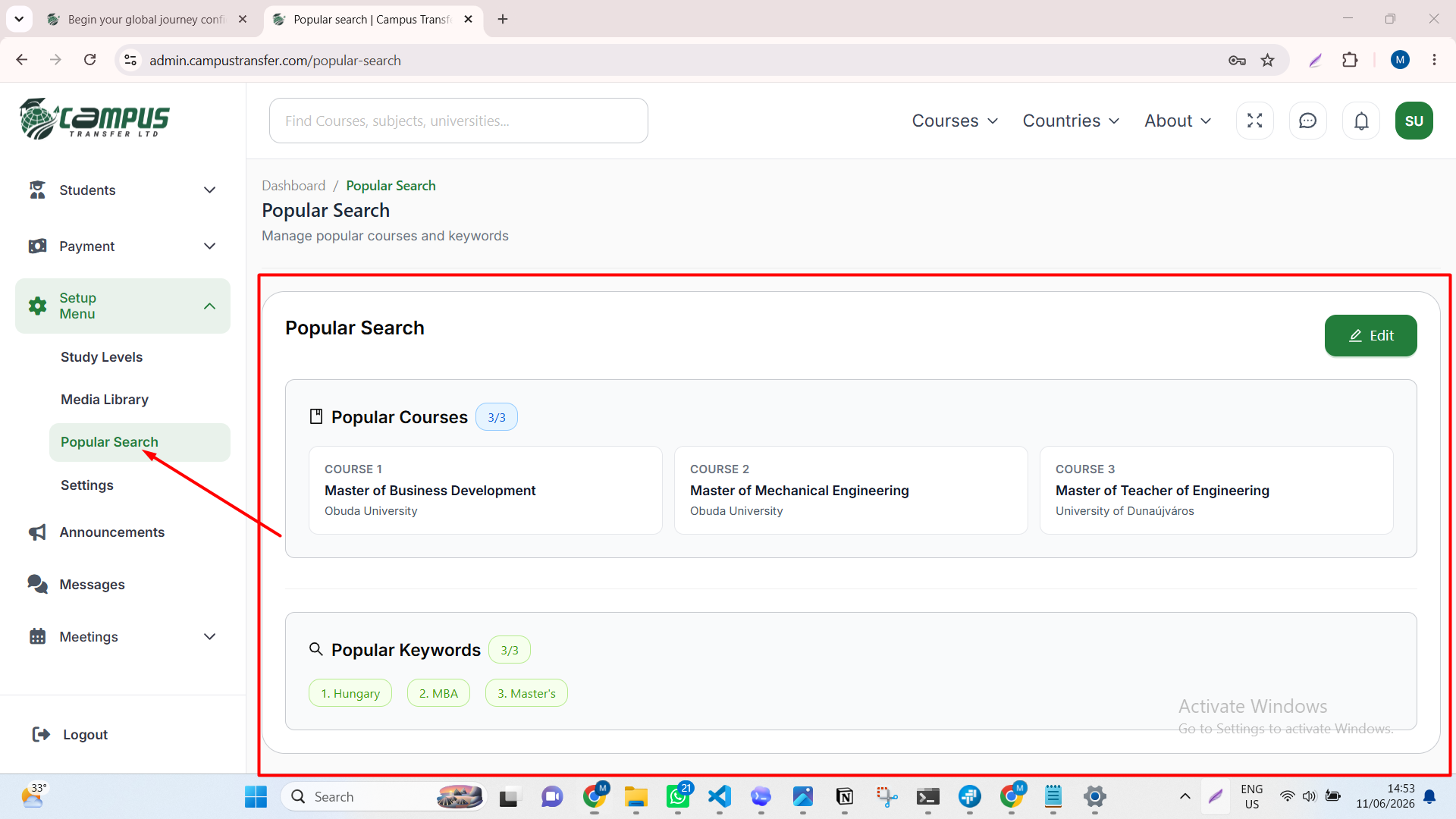
Popular search card management
The popular search card is managed from the admin panel.
Admin panel path: Setup Menu > Popular Search.
Editing popular courses and keywords
On the Popular Search page, the top area controls the popular courses shown in the Home hero search card.
The popular keywords area controls the keyword list shown below the popular courses.
Click the edit button to update this content.
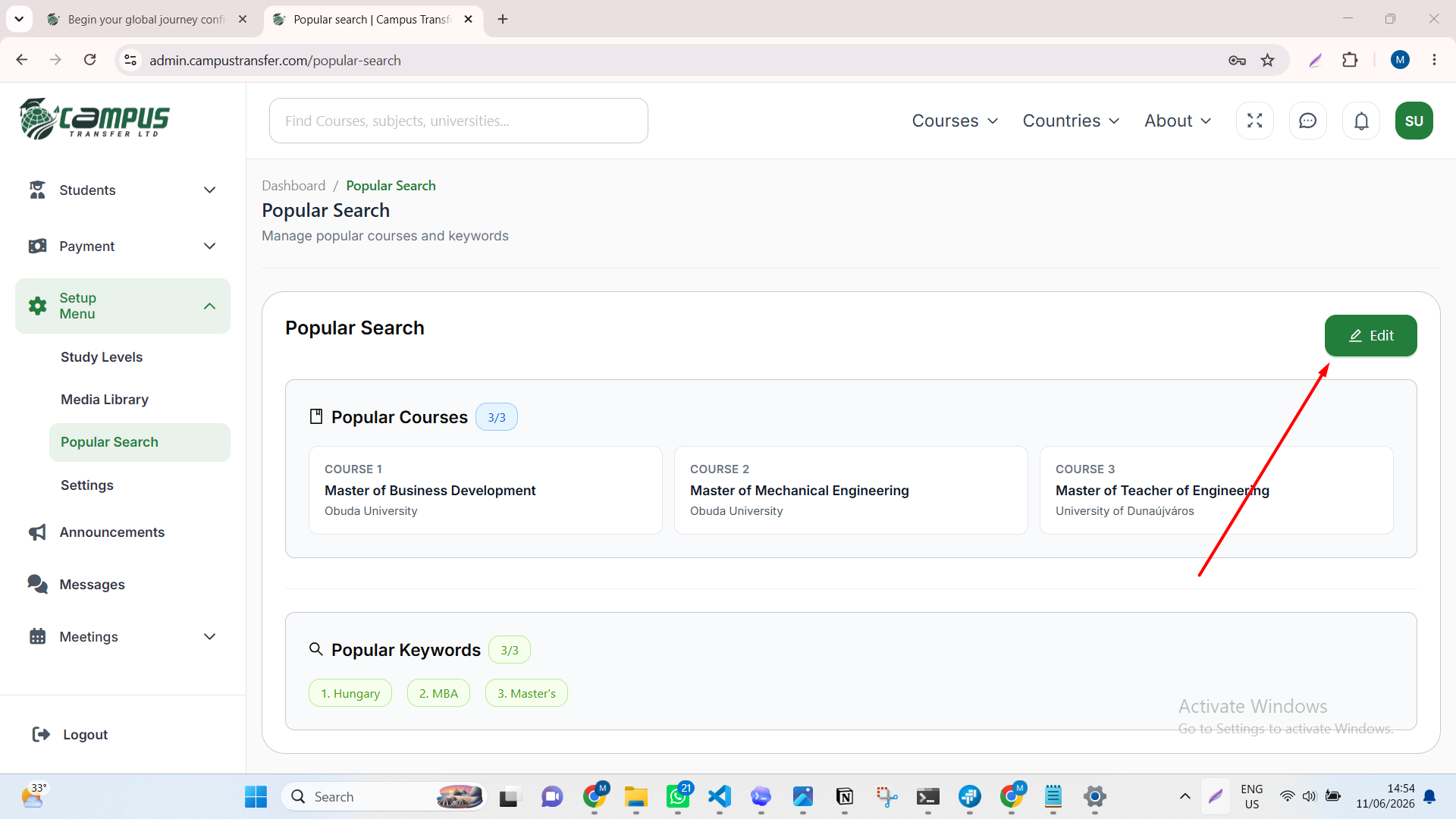
After clicking edit, update the course or keyword fields in the edit view, then save.
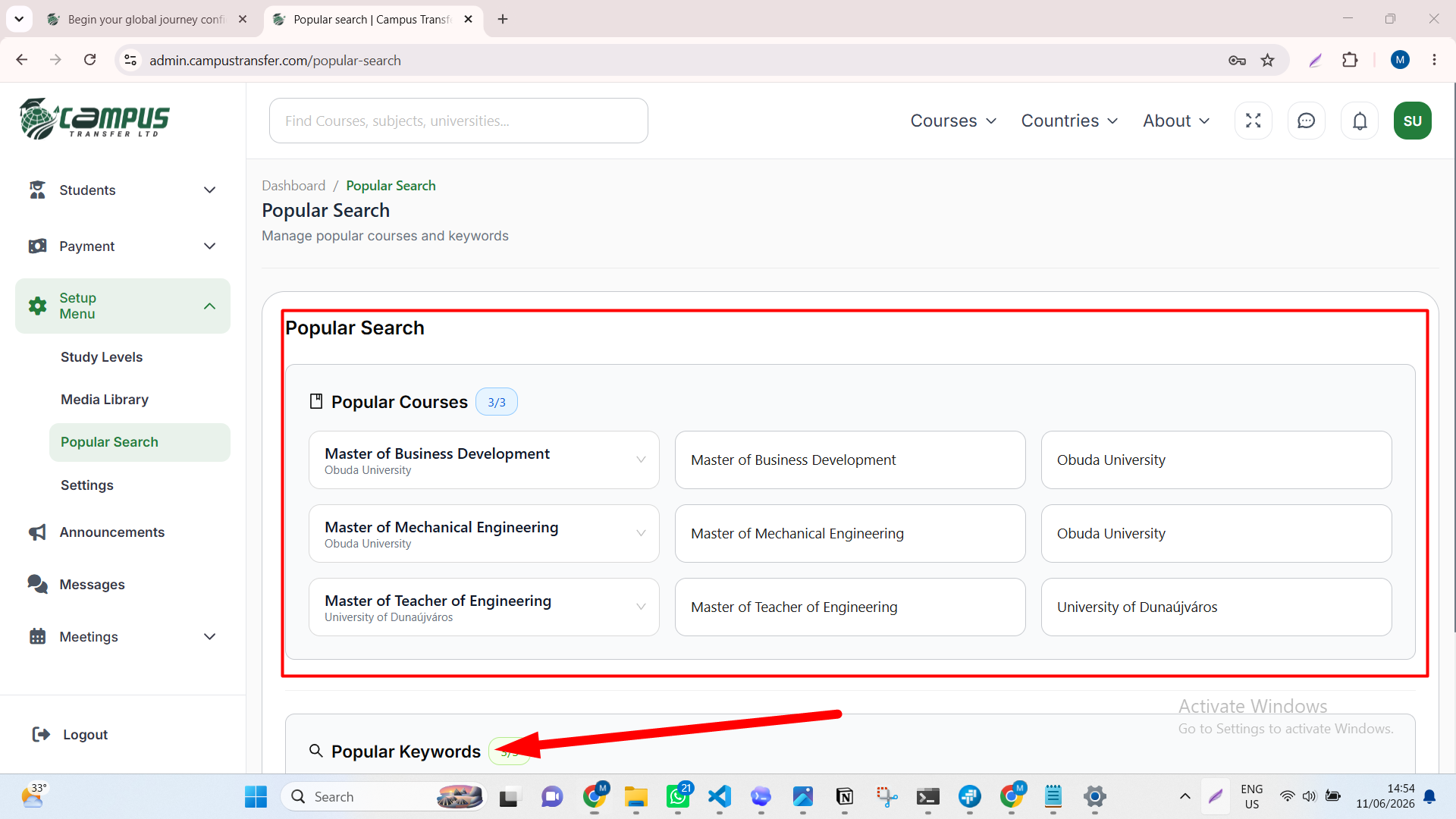
After saving, the website uses the updated popular courses and keywords in the Home hero search card.
Success stories section
This section shows student success stories or testimonial-style content on the Home page.
Details to add later.
Study program section
This section helps visitors understand how they can find or explore study programs.
Details to add later.
Study destinations section
This section highlights countries or destinations available for students.
Details to add later.
Partner or institution section
This section explains partner, institution, or recruitment-related information shown on the Home page.
Details to add later.
Guides, events, or newsroom highlights
This section can show recent guides, events, news, or helpful content.
Details to add later.
Final call-to-action section
This section encourages visitors to take the next step, such as exploring programs, contacting the team, or starting an application.
Details to add later.
About Us
Route: /about-us
Details to add later.
Contact Us
Route: /contact-us
Details to add later.
FAQs
Route: /faqs
Details to add later.
Company Policies
Route: /company-policies
Details to add later.
Terms of Service
Route: /terms-of-service
Details to add later.
Search Results
Route: /results
Details to add later.
Authentication pages
Login
Route: /auth/login
Details to add later.
Register
Route: /auth/register
Details to add later.
Forgot Password
Route: /auth/forgot-password
Details to add later.
Study and discovery pages
Study Destinations
Route: /destinations
Details to add later.
Destination Details
Route: /destinations/[slug]
Details to add later.
Destination Program Details
Route: /destinations/program-details
Details to add later.
Program Details
Route: /program/[slug]
Details to add later.
University Details
Route: /universities/[slug]
Details to add later.
University Details Entry
Route: /university-details
Details to add later.
University Course Details Entry
Route: /university-course-details
Details to add later.
University Course Details
Route: /university-course-details/[slug]
Details to add later.
Course Details
Route: /courses/[universitySlug]/[courseSlug]
Details to add later.
Discover
Route: /discover
Details to add later.
Discover Article Details
Route: /discover/[slug]
Details to add later.
Content and media pages
Guides
Route: /guides
Details to add later.
Guide Details
Route: /guides/[slug]
Details to add later.
Newsroom
Route: /newsroom
Details to add later.
Newsroom Details
Route: /newsroom/[slug]
Details to add later.
Events
Route: /events
Details to add later.
Event Details
Route: /events/[slug]
Details to add later.
Event Success
Route: /events/success
Details to add later.
Video Gallery
Route: /video-gallary
Details to add later.
Our Gallery
Route: /our-gallary
Details to add later.
Partner and campaign pages
Institution Partner
Route: /institution-partner
Details to add later.
Institution Partner Events
Route: /institution-partner/events
Details to add later.
Institution Partner Event Details
Route: /institution-partner/events/[slug]
Details to add later.
Institution Partner Event Success
Route: /institution-partner/events/success
Details to add later.
Recruitment Partner
Route: /recruitment-partner
Details to add later.
Refer and Earn
Route: /refer-and-earn
Details to add later.
Career pages
Career
Route: /career
Details to add later.
Career Details
Route: /career/[slug]
Details to add later.
Career Details Entry
Route: /career-details
Details to add later.
Details to add later
Document each route, page purpose, visible sections, forms, CTA behavior, and related dynamic data.